How to buy a Xiaomi phone online: Unofficial beginner’s guide

redmi note and redmi comparison

After my last not-very-travel-related post, I have another post: Tips and tricks for buying a Xiaomi phone during the sale.

Xiaomi is a Chinese company that makes cheap and alright smartphones. The most basic model available in Singapore, Redmi 1S, is S$169, including shipping charges. This makes it a good enough price point for a backup smartphone, an entry-level phone for people who don’t need that much functionality.

Xiaomi market their phones very cleverly. They don’t sell their products in stores but sell them online during flash sales. These flash sales end really fast because a lot of people want the phone.
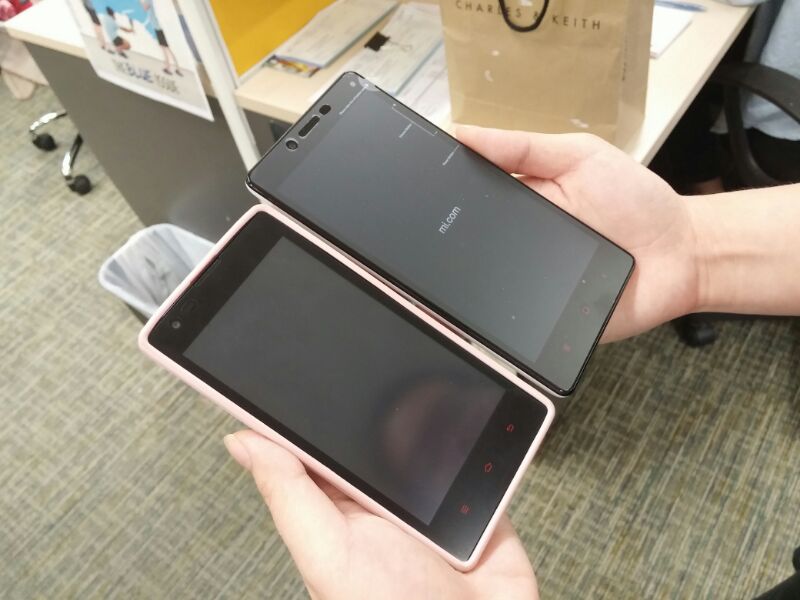
redmi note and redmi comparison

I’m writing this Xiaomi phone-buying guide because I’m a self-proclaimed expert at buying them. epic mi fan

Since March 2014, I’ve bought 13 sets of Xiaomi phones, including one Redmi Note just last week during its first round of sale. (I’ve failed during my first two times trying to buy the phones but afterwards it was smooth sailing.)

Here is the unofficial desperate person’s guide to buying a Xiaomi phone. (The official not-so-desperate buying guide is available on Xiaomi Singapore’s Facebook page.

Things to note about buying a Xiaomi phone:

  • You can only buy one phone at a time.
  • But you may be able to buy multiple accessories (earphones, power bank).
  • Having the phone in your cart does not mean you have bought it, you still need to pay.

What to do a day before a Xiaomi sale

  1. Sign up for an account on mi.com.
  2. Link your credit card to your PayPal account.
  3. Save your Name, Address, Phone Number if your browser allows auto-fill in, even though there is a chance that this will not work.
  4. In case #3 doesn’t work, have your Name, Address, Phone Number typed out in Notepad so you can copy-and-paste fast.

What to do 30 minutes before a Xiaomi sale

  1. Sign in to your Xiaomi account half an hour before the sale starts. The login gets jammed nearer the sale.
  2. About 5 minutes before the sale start, open up TWO tabs of page of the phone you want to get. Example here is the Redmi Note page. Notice that the label says “Out of Stock” on the right. How to buy Redmi Note
  3. For the next 5 minutes, refresh the two tabs. Once the page is refreshed, refresh it again and again.
  4. When 11:59am comes, keep tabs on your tabs, the “Add to Cart” sign might appear. Then you’re off. How to buy Xiaomi
  5. Having your phone in the cart does not mean you have bought them. You’ll need to pay for it. Quickly pick the accessories you need.
  6. Fill up your details. Hopefully Google Autofill will do it for you or else you’ll need to copy-and-paste it.
  7. Next is the payment page, it’ll bring you to PayPal. Since you’ve linked a Credit Card (or anything), you’ll check out super fast.
  8. Voila, you’ve successfully purchased a Xiaomi.
  9. Do Step 1 to 7 again if there’s still stock and you need to buy another phone.

Voila, that’s how you buy a Xiaomi phone. The official guide is available on Xiaomi Singapore’s Facebook Page:

Have you successfully bought any Xiaomi phone? Share your tips.

How to replace a travel guidebook with apps

travel apps to replace a guidebook

For my 4-month trip, I did not bring any physical guidebook with me. My backpack was too small to stuff any guidebooks so I relied heavily on my phone for travel planning.

Although I have PDF copies of some Lonely Planet guidebooks in my computer, I find them  awkward to read on my small netbook screen and even worse on a smartphone.

For travel planning while on the road, I rely heavily on my almost 3-year old iPhone 4 and internet connection. It’s a bit laggy but it works.

I have some apps which I adore for travel planning and I want to share them with you. I only know apps for iOS so if you are looking for Android versions, give the name a Google to see if Play Store has it.

I’m dividing the apps into different periods of travel planning and the relevant apps. For me, the stages of travel planning include:

  1. Knowing more about the place
  2. Booking accommodation
  3. Deciding where to visit, see and have fun
  4. (Bonus) Audioguides

Some of the apps are useful for multiple stages of travel planning so don’t rule them out if you’ve completed the different stages.

1. If you want to know more about a place

At the beginning of location-specific guidebooks, there are usually a few pages (but definitely more than the list of Places of Interest) on the history and culture of the destination. I enjoy reading those when I’m not travelling but while on the road, it’s a bit of a drag to read about what happened 100 years ago.

Instead, I have two apps that work like offline versions of Wikitravel. I forgot the name of one of them so I’ll tell you the other that I know of.

Wikisherpa

WikiSherpa

With the app, you can download Wikitravel-like entries for different destinations. That’s actually it’s weakness because it means that you will need to load the app with destinations instead of surfing randomly for different places.

Still, the app is useful for reading up on a destination and to know safety tips for where you are going.

2. Finding accommodation

One of the most painful parts of travel planning is finding the right place to stay. I get a bit OCD like Goldilocks, flipping through webpages and webpages of different accommodation before finding the right one.

The best thing about mobile booking apps is that they have user reviews. Granted some users leave crazy reviews but generally, you get a good idea of whether you want to stay at the place or not.

Booking.com mobile app

Booking.com

I think this apps is less user friendly than HostelWorld’s app because you cannot have a calendar view of the dates. My mind works in a monthly calendar view.

I used to think that people who booked hotels through mobile phones were crazy. But then I became one of them. It’s much easier for me to lie my bed, click around for a room and booking it immediately.

Hostelworld.com mobile booking app

Hostelworld.com

I like the calendar view when choosing the dates but that’s not what makes this app good. They have a good selection of hostels when you don’t think it’s worth paying double the price for hotel rooms.

3. Deciding places near you to visit, eat and have fun

So you’ve done up a list of places to visit after reading the information from app in stage 1.

Now that you are in the city itself, you don’t really want to spend all that transportation money to somewhere far when you can cross places nearby off your list.

Foursquare mobile app

Foursquare

Before using Foursquare, I thought it was an app for hipsters to show off where they’ve been. This function is still there but I discovered that it can be very useful for travelling.

I use it to discover popular places to eat and what dishes to have. When you save a location on the app, the saved location appears when you are offline as well which is good to avoid getting lost.

The app works better if you check into places (like those darn hipsters) because then it will know if you like cemeteries more than shopping malls.

Tripadvisor City Guide app

TripAdvisor Offline City Guides

I love offline apps and this is my favorite in places where I do not have 3G connection. However, only major cities are included so yu might need to use its less offline-friendly brother.

I use it as a map and guidebook for food and places of interest.

Tripadvisor app

Tripadvisor (requires internet connection)

To be honest, I hate this app because it takes forever to load. But it’s useful for locations not included in  TripAdvisor City Guides since it shows the same content.

4. Audio guide

I found Rick Steves Audio Europe app majorly useful while I was in Europe. I adore the walking tours for the different cities and the museum audio tour which I listen alongside the official museum audioguides.

The copyright of the apps belong to their owners.

Relevant reads:

From Bootsnall: Are Guidebooks Necessary for the Current Travelers?

From Instagram The World: Around the World without a Guidebook

Do you have apps for travelling to recommend?